


Email remains one of the most important communication channels for modern organisations, making the protection and accessibility of email data essential. However, many businesses mistakenly assume that backing up emails and archiving them serve the same purpose. In reality, cloud email archiving and email backup are designed to address different business, compliance, and operational requirements.
Understanding the distinction between these solutions helps organisations improve data governance, support regulatory compliance, and ensure business continuity. This guide explains how cloud email archiving differs from email backup and why many organisations implement both as part of a comprehensive data protection strategy.
How Does Cloud Email Archiving Differ from Email Backup for Businesses?
Cloud email archiving securely preserves emails in a tamper-resistant repository for long-term retention, compliance, and quick retrieval. Email backup, by contrast, creates recoverable copies of mailbox data to restore information after accidental deletion, corruption, or system failure. Together, they support comprehensive email data protection.
What Is Cloud Email Archiving?
Cloud email archiving is the process of automatically capturing, indexing, storing, and preserving email communications in a secure cloud-based repository.
Unlike standard mailbox storage, archived emails remain searchable and protected from unauthorised modification or deletion, depending on organisational retention policies. This makes archiving particularly valuable for regulatory compliance, audits, legal discovery, and long-term record management.
Modern email archiving solutions also offer advanced search capabilities, enabling authorised users to retrieve historical emails quickly without affecting production mailboxes.
What Is Email Backup?
Email backup focuses on disaster recovery and business continuity. A backup creates copies of mailbox data that can be restored if emails are accidentally deleted, systems fail, ransomware affects infrastructure, or data becomes corrupted.
Unlike archiving, backup systems are not primarily designed for compliance or long-term record retention. Instead, they help organisations recover operational data efficiently following unexpected incidents.
Key Differences Between Email Archiving and Email Backup
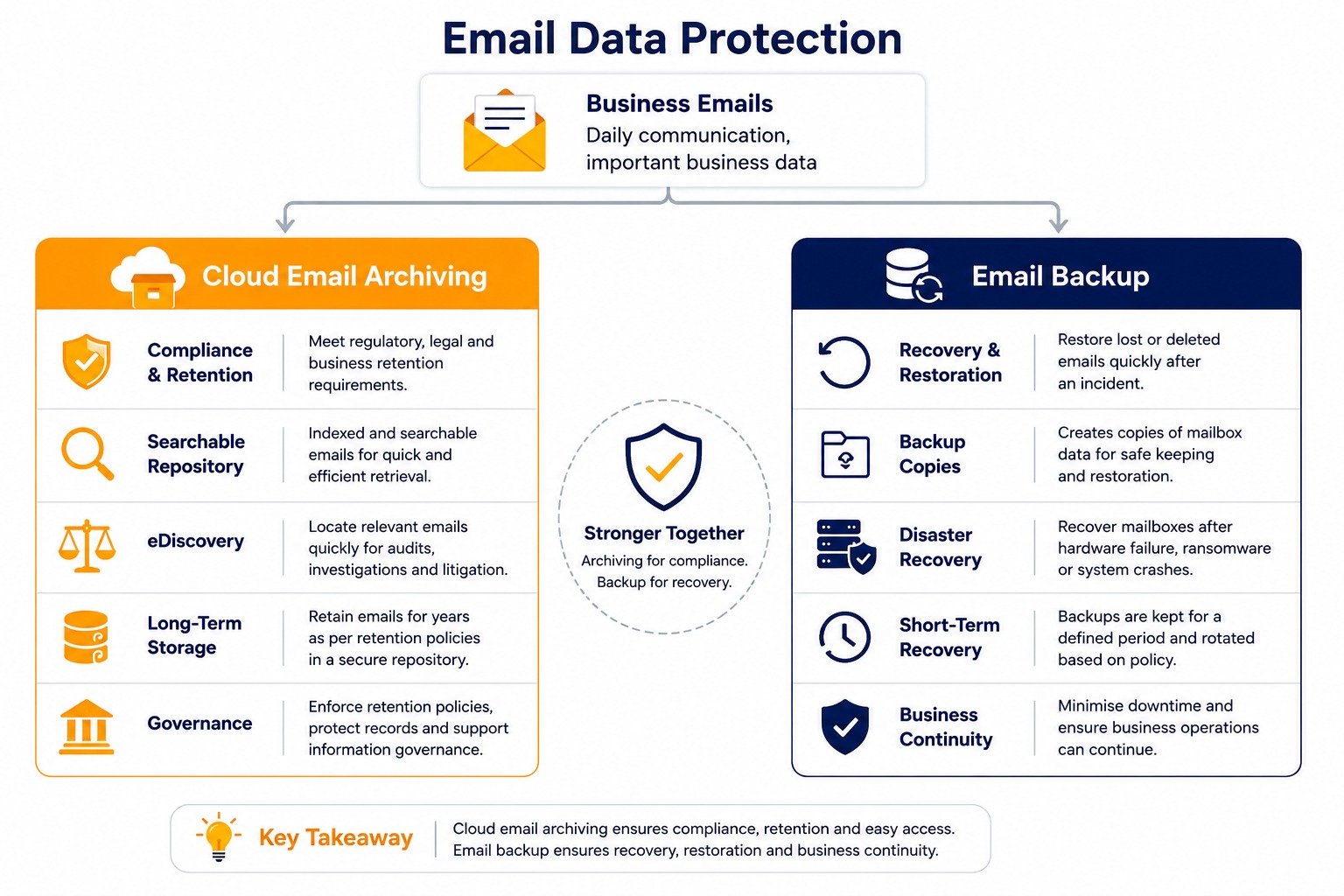
Although both solutions protect business communications, their objectives differ significantly.
Purpose
- Cloud email archiving supports compliance, retention, governance, and efficient information retrieval.
- Email backup focuses on restoring lost or damaged mailbox data.
Data Management
Archived emails are indexed, searchable, and retained according to defined policies, while backup data is primarily intended for recovery rather than routine access.
Storage Approach
Archived emails are generally stored separately from production mailboxes, reducing mailbox size while preserving historical communications. Backup copies are maintained specifically to enable data restoration.
Compliance Support
Archiving solutions are commonly used to support regulatory obligations, legal discovery, and organisational retention requirements, whereas backup solutions primarily strengthen operational resilience.
Why Many Businesses Need Both
Rather than choosing one solution over the other, many organisations implement both because they address different risks.
Combining archiving and backup helps businesses:
- Meet regulatory and legal retention requirements.
- Recover quickly after accidental data loss.
- Improve mailbox performance.
- Simplify eDiscovery processes.
- Strengthen information governance.
- Enhance business continuity planning.
A layered approach provides greater protection than relying on either solution alone.
Choosing the Right Solution
The appropriate strategy depends on organisational requirements, industry regulations, and operational priorities.
Businesses should evaluate:
- Regulatory compliance obligations
- Data retention policies
- Recovery time objectives
- Search and retrieval requirements
- Security controls
- Scalability for future growth
Organisations operating in regulated sectors often benefit from implementing both solutions to satisfy compliance and disaster recovery needs simultaneously.
Email Archiving and Backup: Better Together
Cloud email archiving and backup solutions serve complementary purposes rather than competing ones. While archiving supports compliance, governance, and efficient email retrieval, backup protects organisations against accidental loss, cyber incidents, and system failures. Understanding these differences enables businesses to build a more resilient and compliant email management strategy.
Vaultastic provides intelligent cloud email archiving solutions designed to help organisations securely preserve business communications, simplify regulatory compliance, improve search capabilities, and strengthen long-term information governance with confidence.
To learn more about how a centralized solution can optimize your storage costs and lifecycle, read our full guide on Centralized Cloud-Based Email Archiving Solutions.
Frequently Asked Questions
1. What is cloud email archiving?
Cloud email archiving is the process of securely storing business emails in a searchable, tamper-resistant cloud repository for long-term retention. It supports regulatory compliance, legal discovery, audits, and efficient retrieval while helping organisations manage email data beyond the limits of standard mailbox storage.
2. Is email archiving the same as email backup?
No. Email archiving focuses on long-term retention, compliance, governance, and searchability, whereas email backup is designed to restore mailbox data after accidental deletion, corruption, cyber incidents, or system failures. Both solutions address different business requirements and often work together.
3. Why do businesses need both email archiving and backup?
Using both solutions provides comprehensive protection. Archiving supports compliance, record retention, and information governance, while backup ensures operational recovery following data loss or technical failures. Together, they strengthen business continuity, minimise risk, and improve the overall resilience of organisational email systems.
4. Can archived emails be searched easily?
Yes. Modern cloud archiving platforms index stored emails, making them searchable through advanced filters such as sender, recipient, subject, date, keywords, and attachments. This enables authorised users to retrieve relevant communications quickly during audits, investigations, or routine business operations.
5. How does email backup protect business data?
Email backup creates recoverable copies of mailbox data, allowing organisations to restore emails after accidental deletion, cyberattacks, hardware failures, or software issues. It plays an essential role in disaster recovery planning by reducing downtime and helping maintain uninterrupted business operations.